> For the complete documentation index, see [llms.txt](https://helpcenter.gitprotect.io/llms.txt). Markdown versions of documentation pages are available by appending `.md` to page URLs; this page is available as [Markdown](https://helpcenter.gitprotect.io/backup-and-recovery/devops/azure-devops-and-devops-server/integration/adding-azure-devops-server-to-gitprotect.md).
# Adding Azure DevOps Server to GitProtect
This article explains how to add an Azure DevOps Server organization to GitProtect.
#### Adding an Azure DevOps Server to GitProtect connects your projects and repositories to the platform, enabling seamless backup management and secure data protection.
***
## Using a Personal Access Token (PAT)
{% hint style="warning" %}
**Azure DevOps Server** (self-managed, on-premise) does not support **OAuth** and requires a **personal access token**.
{% endhint %}
{% stepper %}
{% step %}
Log in to **GitProtect Management Service**, open the **DevOps** tab on the left side of the window, and select **Azure DevOps** from the list.
{% endstep %}
{% step %}
Click the **Connect** button under **Azure DevOps Server**.
{% endstep %}
{% step %}
Set your authentication method.
1. In **Authentication**, select **Azure DevOps Server**.
2. Enter the **service address** of your **Azure DevOps Server** (IP or DNS name, including the protocol).
3. Add or select **PAT** from the **Password Manager**.
4. Choose whether **GitProtect** should automatically add new repositories to your backup.
{% endstep %}
{% step %}
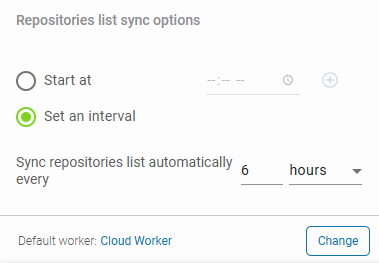
Configure your repository sync and default worker. Specify hours for synchronization, or set a time interval for automatic updates.
{% hint style="warning" %}
Cloud workers cannot access local network storage. Choose a device with the necessary access if backing up locally.
{% endhint %}
{% endstep %}
{% step %}
Click **Proceed** to complete adding your **Azure DevOps Server** organization and grant **GitProtect** access to the specified resources.
{% endstep %}
{% step %}
Your **Azure DevOps Server** organization has now been successfully added to **GitProtect**. Click **Custom policy** to adjust your backup policy settings, or click **Run backup** to execute the backup immediately using the current policy configuration.
{% endstep %}
{% endstepper %}