> For the complete documentation index, see [llms.txt](https://helpcenter.gitprotect.io/llms.txt). Markdown versions of documentation pages are available by appending `.md` to page URLs; this page is available as [Markdown](https://helpcenter.gitprotect.io/backup-and-recovery/devops/bitbucket-data-center/integration/adding-a-bitbucket-dc-instance-to-gitprotect.md).
# Adding a Bitbucket DC instance to GitProtect
This article explains how to add a Bitbucket DC organization to GitProtect.
## Using username and password
{% stepper %}
{% step %}
Log in to **GitProtect Management Service**, open the **DevOps** tab on the left side of the window, and select **Bitbucket** from the list.
{% endstep %}
{% step %}
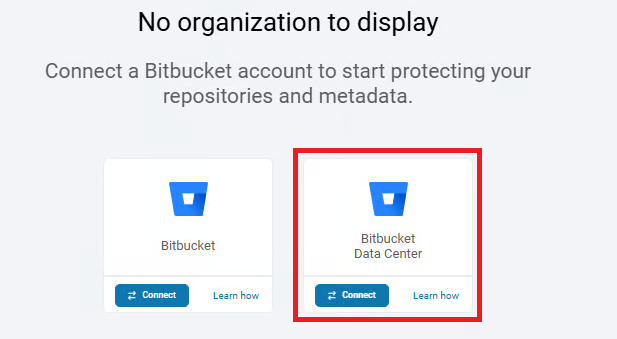
Click the **Connect** button under **Bitbucket Data Center**.
{% endstep %}
{% step %}
Set your authentication method.
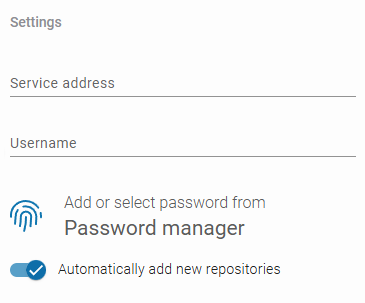
1. In **Authentication**, select **Bitbucket DC**.
2. Enter the **Bitbucket DC** server IP address and your **username**.
3. Add or select **password** from the **Password Manager** (same as your **Bitbucket DC** credentials).
{% hint style="success" %}
For **Bitbucket DC**, you can also use an HTTP access token instead of a password.
{% endhint %}
4. Choose whether **GitProtect** should automatically add new repositories to your backup.
{% endstep %}
{% step %}
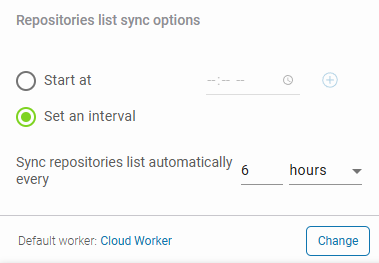
Configure your repository sync and default worker. Specify hours for synchronization, or set a time interval for automatic updates.
{% endstep %}
{% step %}
Click **Proceed** to complete adding your **Bitbucket DC** organization and grant **GitProtect** access to the specified resources.
{% endstep %}
{% endstepper %}
***
## Useful links and items
{% embed url="" %}
{% embed url="" %}