# Required permissions

## Account

To install the **GitProtect** application, you must use an account with sufficient privileges, typically an **administrator account**. Additionally, the application requires the following permissions to function correctly:

* [x] Full control of projects
* [x] Read team discussions
* [x] Read organization and team membership, read organization projects
* [x] Read all user profile data
* [x] Full control of private repositories
* [x] Access user email addresses (read-only)
* [x] Update **GitHub Action** workflows

These permissions ensure seamless integration and proper functionality of the application within the intended environment.

💡 Below you can find examples of different types of permissions along with their explanations.

<details>

<summary>PERMISSIONS</summary>

| TYPE                                            | LEVEL    |                                                                     |
| ----------------------------------------------- | -------- | ------------------------------------------------------------------- |
| **Owner**                                       | default  | Full backup and restore.                                            |
|                                                 | admin    | Full backup and restore.                                            |
|                                                 | write    | Full backup and restore.                                            |
|                                                 | read     | Full backup. Restore only to your own account.                      |
| **Member**                                      | admin    | Full backup. Restore only to your own account.                      |
|                                                 | maintain | Full backup. Restore only to your own account.                      |
|                                                 | write    | Full backup. Restore only to your own account.                      |
|                                                 | triage   | Backup (excluding collaborators). Restore only to your own account. |
| **Collaborator** (external in the organization) | read     | Backup (excluding collaborators). Restore only to your own account. |
| **Collaborator** (outside the organization)     | default  | Backup (excluding collaborators). Restore only to your own account. |

</details>

***

## Personal Access Token (PAT)

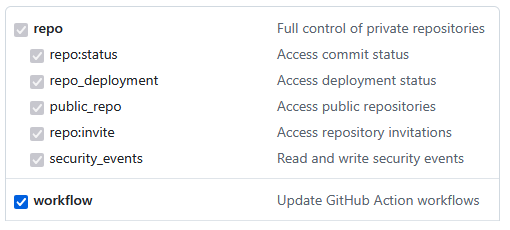
The minimum authorization permissions required for the token to register the **GitProtect** application and perform repository backup and restore are: **repo** and **workflow**.

<figure><img src="https://696332517-files.gitbook.io/~/files/v0/b/gitbook-x-prod.appspot.com/o/spaces%2FtsE6XtJyUIEKVdSxPlS3%2Fuploads%2Fgit-blob-288181ba305c8973848c1cffc1df909b985485bb%2FPAT%20permissions.png?alt=media" alt=""><figcaption></figcaption></figure>

{% hint style="danger" %}
**With minimal privileges, certain metadata may not be included in the backup process.** Select the necessary permissions based on the specific data you need to protect.
{% endhint %}

You can generate a **personal access token** in the **Developer settings** > **Personal access tokens** section of your **GitHub** account. When creating a **PAT**, you can assign different types of permissions— the list below outlines the permissions required to back up specific repository metadata within your organization:

1. **admin:org** — allows you to read the organization's projects.
2. **project** — allows you to read the projects from which the repository comes.
3. **read:discussion** — allows you to read team discussions.
4. **read:public\_key** — grants access to keys.
5. **read:repo\_hook** — grants access to webhooks.
6. **repo** — grants access to repositories.

{% hint style="info" %}
Learn more about user access tokens in [the official **GitHub** documentation](https://docs.github.com/en/apps/creating-github-apps/authenticating-with-a-github-app/generating-a-user-access-token-for-a-github-app).
{% endhint %}

{% hint style="warning" %}
If you grant only **read** permissions, you will be able to perform a backup, but restoring data will require generating a new token with **write** permissions.
{% endhint %}