> For the complete documentation index, see [llms.txt](https://helpcenter.gitprotect.io/llms.txt). Markdown versions of documentation pages are available by appending `.md` to page URLs; this page is available as [Markdown](https://helpcenter.gitprotect.io/backup-and-recovery/jira/integration/adding-jira-organization-to-gitprotect.md).
# Adding Jira organization to GitProtect
This article describes the process of adding a Jira organization to GitProtect.
#### Adding Jira organization to GitProtect connects your environment to the platform so you can start protecting its data.
***
## Using an API token
{% hint style="danger" %}
For **Jira**, use the classic token — **GitProtect does not support scoped tokens**.
{% endhint %}
{% hint style="warning" %}
Before adding your **Jira** organization to **GitProtect**, [check if your account has the required permissions](/backup-and-recovery/jira/integration/required-permissions.md) for all spaces you want to protect.
{% endhint %}
{% stepper %}
{% step %}
Log in to **GitProtect Management Service**, open the **DevOps** tab on the left side of the window, and select **Jira** from the list.
{% endstep %}
{% step %}
Click the **Connect** button under **Jira Software** or **Jira Service Management** (depending on your needs).
{% endstep %}
{% step %}
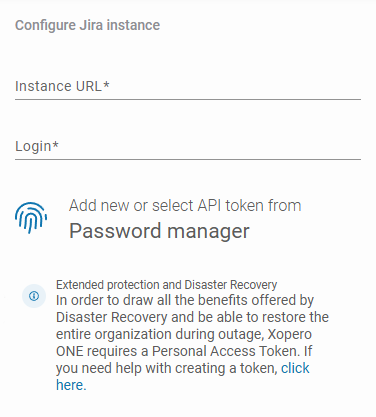
Enter your **instance URL** (for example, ) and your **Jira** login, then add or select an [API token](https://support.atlassian.com/atlassian-account/docs/manage-api-tokens-for-your-atlassian-account/#Create-an-API-token) from the **Password Manager**.
{% hint style="success" %}
**GitProtect** can secure organizations that have a custom domain configured, but the organization must be added using its original URL, which can be found in > **Apps** > **App URLs** > **Custom domains** > **Actions** > **Show details**.
{% endhint %}
{% hint style="info" %}
Learn more about custom domains in [this article](/backup-and-recovery/jira/integration/custom-domains.md).
{% endhint %}
{% endstep %}
{% step %}
Configure your spaces sync and default worker — specify hours for synchronization, or set a time interval for automatic updates. Once done, click **Proceed**.
{% hint style="warning" %}
The account used for the authorization process must have **at least site admin permissions**.
{% endhint %}
{% endstep %}
{% step %}
Your **Jira** organization has now been successfully added to **GitProtect** — click **Custom policy** to adjust your backup policy settings, or click **Run backup** to execute the backup immediately using the current policy configuration.
{% hint style="info" %}
Granular backup is the default policy configuration applied to any new **Jira** organization you add to **GitProtect**.
{% endhint %}
{% endstep %}
{% endstepper %}
***
## Useful links and items
{% content-ref url="/pages/UqZB5pnMCMIjkZ8bOASb" %}
[Required permissions](/backup-and-recovery/jira/integration/required-permissions.md)
{% endcontent-ref %}
{% embed url="" %}