# Tasks details

## Backup

You can view all task details in the **Tasks** tab of the **GitProtect Management Service** system—click the **info** <img src="https://696332517-files.gitbook.io/~/files/v0/b/gitbook-x-prod.appspot.com/o/spaces%2FtsE6XtJyUIEKVdSxPlS3%2Fuploads%2Fgit-blob-198563644f2ad3114b415f2d2e342884d9e09f72%2Fimage.png?alt=media" alt="" data-size="line"> icon next to the selected task to open the details panel.

### <mark style="background-color:blue;">**Summary**</mark>

The summary provides key information about each backup, including the **plan name**, **status**, **end date**, and **duration**. It also shows the **backup type**, **device name**, and details about **transferred data** — divided into **data size** and **retention size** — along with the **total number of transferred files**.

<figure><img src="https://696332517-files.gitbook.io/~/files/v0/b/gitbook-x-prod.appspot.com/o/spaces%2FtsE6XtJyUIEKVdSxPlS3%2Fuploads%2Fgit-blob-9d9f81086e193b8171830cec5c3c7f1783bce250%2Fimage.png?alt=media" alt=""><figcaption><p><em>Backup summary example.</em></p></figcaption></figure>

### <mark style="background-color:blue;">Task details</mark>

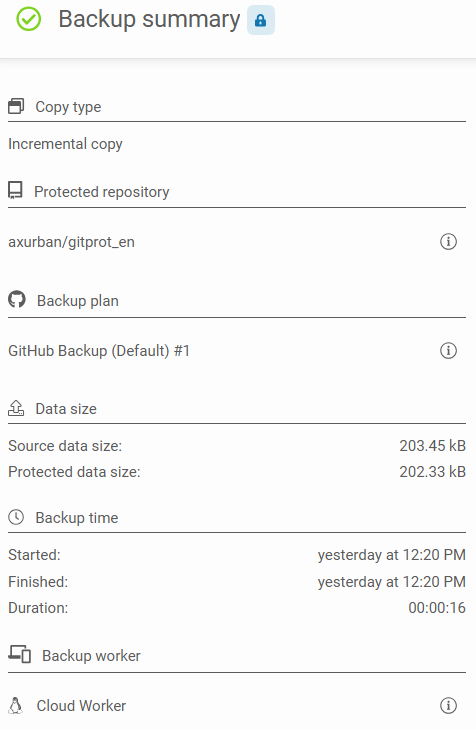
To view more information, click the **Task details** ![](https://696332517-files.gitbook.io/~/files/v0/b/gitbook-x-prod.appspot.com/o/spaces%2FtsE6XtJyUIEKVdSxPlS3%2Fuploads%2Fgit-blob-922bbc38d4f24e4d9beffa1412e2334d18dcc410%2Fimage.png?alt=media) button on the right. A side panel will appear, showing sections for the **protected device**, **backup plan**, **data size**, and **backup time**. You can also see additional details, such as the task’s **start** and **end time**.

<figure><img src="https://696332517-files.gitbook.io/~/files/v0/b/gitbook-x-prod.appspot.com/o/spaces%2FtsE6XtJyUIEKVdSxPlS3%2Fuploads%2FH7a7FFsanzDR2sew5iIQ%2Fimage.png?alt=media&#x26;token=e0e5825b-c5b0-4906-8a4d-7f86c2c863a0" alt="" width="357"><figcaption></figcaption></figure>

Below, you will find a **status details** section, where you can check the number of directories and files in the **successfully protected**, **failed**, **errors**, and **warnings** sections. A similar view is available for all secured resources.

Depending on the type of backup being performed, there may also be sections such as **sent data**, **throttling diagnostics**, or **new resources**.

{% hint style="warning" %}
If any files have been modified, **GitProtect** system will indicate how many resources were changed. **Deleted resources**, however, are those removed according to the retention rules defined in the backup plan.
{% endhint %}

<div><figure><img src="https://696332517-files.gitbook.io/~/files/v0/b/gitbook-x-prod.appspot.com/o/spaces%2FtsE6XtJyUIEKVdSxPlS3%2Fuploads%2Fgit-blob-ef957a1703d1d16659c4f9892c81d61a74556276%2F3.png?alt=media" alt="Status details in the backup task summary"><figcaption></figcaption></figure> <figure><img src="https://696332517-files.gitbook.io/~/files/v0/b/gitbook-x-prod.appspot.com/o/spaces%2FtsE6XtJyUIEKVdSxPlS3%2Fuploads%2Fgit-blob-35393fdfdec2c28717da056adb5dc328bb84796d%2Fimage.png?alt=media" alt=""><figcaption></figcaption></figure></div>

***

## Restoration

### <mark style="background-color:blue;">Summary</mark>

Similarly to the backup summary, restoration summary contains information about the **plan name**, **status**, **end date**, and **duration**, as well as details about the **device name**, **restored size**, and **restored sources**.

<figure><img src="https://696332517-files.gitbook.io/~/files/v0/b/gitbook-x-prod.appspot.com/o/spaces%2FtsE6XtJyUIEKVdSxPlS3%2Fuploads%2Fgit-blob-c58cd6d726e43d47a8a4031beb8052c9a7081f35%2F1.png?alt=media" alt="A row with task information in the Task tab in the GitProtect Management Service"><figcaption><p><em>Restoration summary example.</em></p></figcaption></figure>

### <mark style="background-color:blue;">Task details</mark>

To view more information about the restoration task, click the **Task details** ![](https://696332517-files.gitbook.io/~/files/v0/b/gitbook-x-prod.appspot.com/o/spaces%2FtsE6XtJyUIEKVdSxPlS3%2Fuploads%2Fgit-blob-922bbc38d4f24e4d9beffa1412e2334d18dcc410%2Fimage.png?alt=media) button on the right. A side panel will appear, showing sections for the **restore worker**, **type and creation date of backup**, **data source**, **data destination**, **data size**, and **backup time**. You can also see additional details, such as the task’s **start** and **end time**.

<figure><img src="https://696332517-files.gitbook.io/~/files/v0/b/gitbook-x-prod.appspot.com/o/spaces%2FtsE6XtJyUIEKVdSxPlS3%2Fuploads%2Fgit-blob-2e4977b0fcb3252de9e30584ef0d98c0ea1df0cb%2Fimage.png?alt=media" alt=""><figcaption><p><em>Restoration task details panel.</em></p></figcaption></figure>

Below, you will find the **details status**, where you can check the number of restored directories and files in the **successfully protected**, **failed**, **errors**, and **warnings** sections. A similar view is available for **all secured resources**, along with additional information about **overwritten data** and **omitted resources**.

<div><figure><img src="https://696332517-files.gitbook.io/~/files/v0/b/gitbook-x-prod.appspot.com/o/spaces%2FtsE6XtJyUIEKVdSxPlS3%2Fuploads%2Fgit-blob-706492c9593d8235de3e7d203d85e28c67f0e02b%2F3.png?alt=media" alt="Status details in the restore task summary"><figcaption></figcaption></figure> <figure><img src="https://696332517-files.gitbook.io/~/files/v0/b/gitbook-x-prod.appspot.com/o/spaces%2FtsE6XtJyUIEKVdSxPlS3%2Fuploads%2Fgit-blob-48f9b6aa88caa07c1aafe557e5080bc76210f68f%2F4.png?alt=media" alt="Restored data in the restore task summary"><figcaption></figcaption></figure></div>

***

## Replication

### <mark style="background-color:blue;">Summary</mark>

The replication summary contains information about the **replication plan name**, **status**, **end date**, and **duration**, as well as details about the **device name**, **source storage**, and **target storage**.

<figure><img src="https://696332517-files.gitbook.io/~/files/v0/b/gitbook-x-prod.appspot.com/o/spaces%2FtsE6XtJyUIEKVdSxPlS3%2Fuploads%2Fgit-blob-28dd23b3aae15a0a4dc42542fb20468a623437a5%2F1.png?alt=media" alt="A row with task information in the Task tab in the GitProtect Management Service"><figcaption><p><em>Replication summary example.</em></p></figcaption></figure>

### <mark style="background-color:blue;">Task details</mark>

To view more information about the restoration task, click the **Task details** ![](https://696332517-files.gitbook.io/~/files/v0/b/gitbook-x-prod.appspot.com/o/spaces%2FtsE6XtJyUIEKVdSxPlS3%2Fuploads%2Fgit-blob-922bbc38d4f24e4d9beffa1412e2334d18dcc410%2Fimage.png?alt=media) button on the right. A side panel will appear, displaying the following sections: **source storage**, **target storage**, **replication plan**, **worker**, **data size**, and **replication time**.

<figure><img src="https://696332517-files.gitbook.io/~/files/v0/b/gitbook-x-prod.appspot.com/o/spaces%2FtsE6XtJyUIEKVdSxPlS3%2Fuploads%2Fgit-blob-8670084abb18c19832f39c8284bfb934e7a136ce%2F2.png?alt=media" alt="Replication summary in the replication task"><figcaption><p><em>Replication task details panel.</em></p></figcaption></figure>

Below, same as for backup and restoration, you will find the **status details** section, where you can check the **number of replication directories and files** in the **successfully protected**, **failed**, **errors**, and **warnings** sections.

<figure><img src="https://696332517-files.gitbook.io/~/files/v0/b/gitbook-x-prod.appspot.com/o/spaces%2FtsE6XtJyUIEKVdSxPlS3%2Fuploads%2Fgit-blob-b8c9eb317da9a84d7decc3fbcbe7b2bd2907e0a7%2F3.png?alt=media" alt="Status details in the replication task summary"><figcaption></figcaption></figure>