> For the complete documentation index, see [llms.txt](https://helpcenter.gitprotect.io/llms.txt). Markdown versions of documentation pages are available by appending `.md` to page URLs; this page is available as [Markdown](https://helpcenter.gitprotect.io/management/user-accounts/changing-the-root-admin.md).
# Changing the Root Admin
This article provides information on how to change the Root Administrator in GitProtect.
To change the **root admin**, please follow these steps:
{% stepper %}
{% step %}
Log in to the **GitProtect Management Service** panel using the current **Root Administrator** account.
{% endstep %}
{% step %}
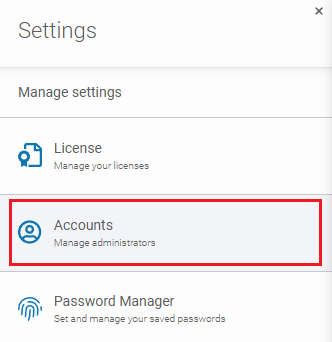
Click ⚙ **Settings** at the bottom-right of the left-side menu, and select **Accounts**.
{% endstep %}
{% step %}
Add a new user account with the desired email address, or select an existing account.
{% endstep %}
{% step %}
Click the **edit** button next to the newly created user account. In the account panel, scroll down to the bottom and select **Set as root**.
{% hint style="danger" %}
After selecting this option, you will be logged out automatically.
{% endhint %}
{% endstep %}
{% step %}
The **Root Administrator** has now been changed to your new account—log back in using your new credentials to verify that the change was successful.
{% endstep %}
{% endstepper %}
 button next to the newly created user account. In the account panel, scroll down to the bottom and select **Set as root**.
{% hint style="danger" %}
After selecting this option, you will be logged out automatically.
{% endhint %}
button next to the newly created user account. In the account panel, scroll down to the bottom and select **Set as root**.
{% hint style="danger" %}
After selecting this option, you will be logged out automatically.
{% endhint %}
