> For the complete documentation index, see [llms.txt](https://helpcenter.gitprotect.io/llms.txt). Markdown versions of documentation pages are available by appending `.md` to page URLs; this page is available as [Markdown](https://helpcenter.gitprotect.io/storage/cloud-storage/wasabi/permissions.md).
# Permissions
This article lists the minimal permissions required for a **Wasabi** bucket to be used as backup storage in **GitProtect**. The policies below allow you to add your **Wasabi** storage to the **GitProtect** platform, store backup data, and restore it when needed.
***
## Wasabi bucket policy
Access keys are generated for each **Wasabi** user account. You can view the list of access keys by logging in to your **Wasabi** account and navigating to the **Access Keys** tab.
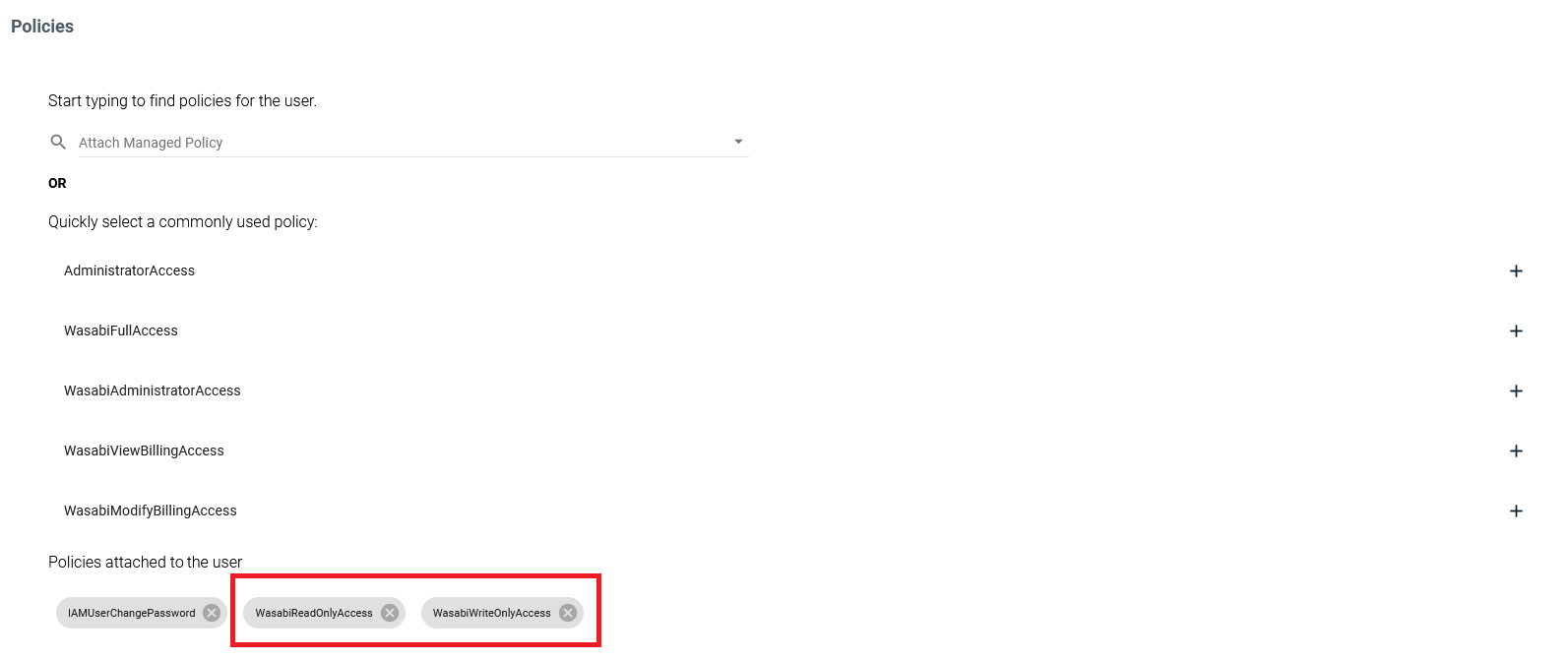
To create a new user account or edit an existing one, go to the **Users** tab. In the **Policies** section, select **WasabiReadOnlyAccess** and **WasabiWriteOnlyAccess**, according to your needs.
***
## Support for immutable storage
{% hint style="warning" %}
Remember that immutable storage configuration is available only when creating a new bucket — there is no option to enable it for an existing bucket.
{% endhint %}
{% hint style="danger" %}
Enabling retention and/or versioning for the bucket may result in additional data being stored. It is recommended that the retention period in **GitProtect** be longer than the one set for the storage. Otherwise, this may lead to storage overload.
{% endhint %}
If you want to use immutable storage, the following permissions are required:
{% code title="Required to read Object Lock" overflow="wrap" %}
```json
s3:GetBucketObjectLockConfiguration
```
{% endcode %}
{% code title="Required to read the versioning configuration" overflow="wrap" %}
```json
configuration.s3:GetBucketVersioning
```
{% endcode %}
It must be added to the **Action** section, and after the changes, the section should look as shown below:
```json
"Action": [
"s3:ListBucket",
"s3:GetObject",
"s3:PutObject",
"s3:DeleteObject",
"s3:GetBucketVersioning",
"s3:GetBucketObjectLockConfiguration"
],
```
{% code title="Example policy configuration" %}
```json
{
"Version": "2012-10-17",
"Statement": [
{
"Sid": "AllowPublicRead",
"Effect": "Allow",
"Principal": {
"AWS": "arn:aws:iam::100000176259:user/xone-storage"
},
"Action": [
"s3:ListBucket",
"s3:GetObject",
"s3:PutObject",
"s3:DeleteObject",
"s3:GetBucketVersioning",
"s3:GetBucketObjectLockConfiguration"
],
"Resource": [
"arn:aws:s3:::xopero-test/*",
"arn:aws:s3:::xopero-test"
]
}
]
}
```
{% endcode %}
> `arn:aws:iam::100000176259:user/xone-storage` — **Wasabi** user
>
> `arn:aws:s3:::xopero-test` — **Wasabi** bucket
## Useful links and items
{% embed url="" %}
{% embed url="" %}